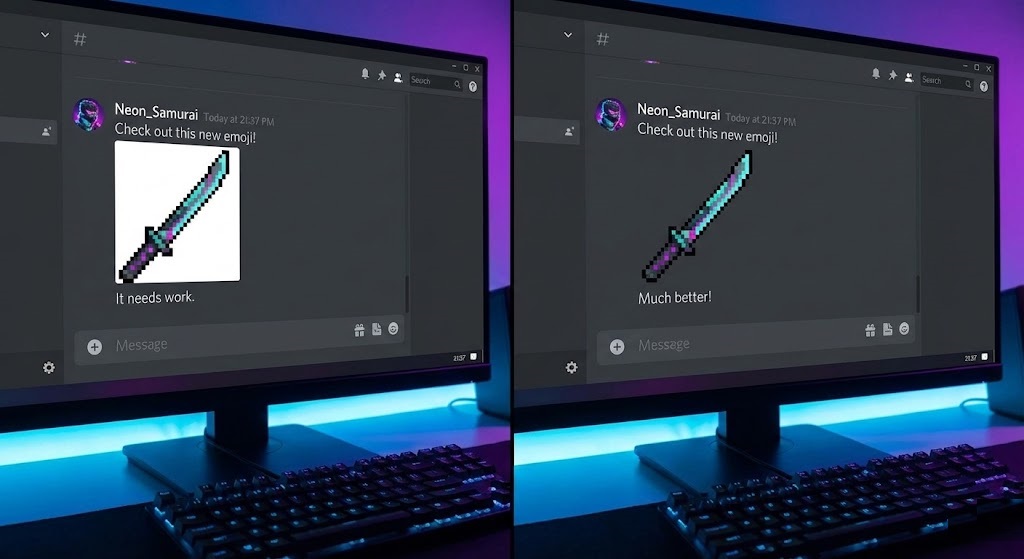
The “White Box” Sin in Dark Mode
You found the perfect funny face, meme, or inside joke to add to your Discord server. You upload it as a custom emoji, type the command, and… gross.
The image appears tiny, surrounded by a blinding white square. Because 99% of Discord and Twitch users use “Dark Mode,” that white box sticks out like a sore thumb. It ruins the aesthetic of your chat and makes your server look amateur.
If you want to be a top-tier server admin or streamer, you need a dedicated Discord emote background remover. With rmvbg.net, you can create clean, transparent emotes in seconds.
Why Transparency Matters for Emotes
Emotes are small. On Discord, standard emojis render at 32×32 pixels (though you upload them larger). On Twitch, they can be as small as 28×28 pixels.
At this size, every pixel counts.
- The “Halo” Effect: If you use a bad background remover, you get a thin white line around the edge. In Dark Mode, this looks like dirt.
- Shape Recognition: A square image is harder to recognize at small sizes than a cut-out shape. By removing the background, you allow the “Subject” (the face) to take up more of the allowed space, making it easier to see.
Discord vs. Twitch Requirements
Before you upload, you need to know the rules. Our tool creates high-quality PNGs that work for both.
| Platform | Max File Size | Background | Our Solution |
|---|---|---|---|
| Discord Emoji | 256KB | Transparent | Optimized PNG |
| Discord Sticker | 512KB | Transparent | HD PNG (320×320) |
| Twitch Emote | 1MB (Auto-resize) | Transparent | Auto-Resize Ready |
Step-by-Step: From Meme to Emote
Let’s say you want to turn a photo of your friend’s funny face into an emote.
Step 1: The Crop
Before uploading, crop your photo as close to the face as possible. Emotes are square. If your photo is a wide landscape, the face will be tiny.
Step 2: The Transparency
Upload your cropped photo to rmvbg.net. Our AI will strip away the room behind your friend, leaving just the head.
Step 3: The Resize (Optional)
Discord will automatically resize images up to 128×128 pixels, but it’s best to upload a clean PNG. Download your file from us—it is already optimized for web use.
Step 4: Upload
Go to Server Settings > Emoji > Upload Emoji. Select your transparent file.
Result: A clean, professional emote that floats perfectly in the chat.
Making Discord “Stickers” (The New Meta)
Stickers are the new, larger version of emotes (160×160 pixels). Because they are bigger, edge quality matters even more. A jagged cutout is very obvious on a Sticker.
rmvbg.net uses “anti-aliasing” (smoothing) on the edges. This means your Sticker will look smooth and round, not pixelated, even on high-resolution monitors.
For Twitch Streamers: Sub Badges
Subscriber badges sit next to a user’s name in chat. They are tiny (18×18 pixels). If you don’t remove the background perfectly, a Sub Badge just looks like a colored dot.
Use our tool to ensure the shape of the badge Discord emote background remover (star, heart, shield) is clearly defined. Transparency allows the badge to “interact” with the chat background color, making it pop.
Conclusion
Don’t let white boxes clutter your chat. Your community deserves better.
Use rmvbg.net to build a library of custom, transparent assets. It is the secret weapon of the best Discord servers and Twitch channels. Upgrade your emote game today.